AWS Lambda is a serverless compute service. In simple terms, it lets you run your code without managing a server yourself.
You write a function, upload it to AWS, and tell AWS when that function should run. AWS takes care of the servers, operating system, scaling, and infrastructure.
Instead of keeping a server running 24/7 waiting for requests, AWS Lambda starts a server only when it’s needed, runs your code, and then stops it when the work is finished. You only pay for the time your code is running.
Let’s understand what happens behind the scenes, step by step.
1. What actually happens when you create a Lambda?
Suppose you create a Lambda function:
export const handler = async (event) => {
    console.log("Hello from Lambda");

    return {
        statusCode: 200,
        body: "Success"
    };
};
You are essentially telling AWS:
“Whenever something happens, run this piece of code.”
The important part is the handler:
handler
AWS knows that this is the function it needs to execute.
2. Something triggers the Lambda
A Lambda function normally doesn’t run continuously.
Something needs to trigger it.
For example:
User
  ↓
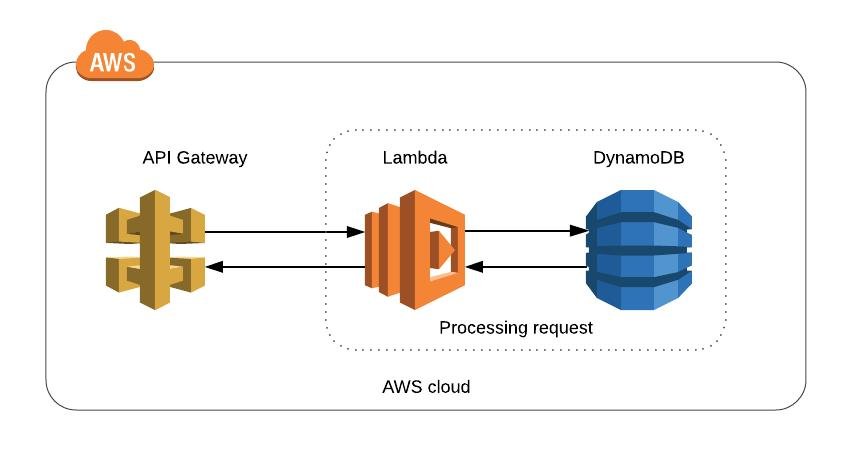
API Gateway
  ↓
Lambda
  ↓
Your Code
Or:
File uploaded to S3
        ↓
      Lambda
        ↓
   Process the file
Or:
Cognito
   ↓
Lambda Trigger
   ↓
Migration / Validation Logic
Other common triggers include:
- API Gateway
- S3
- Cognito
- EventBridge
- SQS
- DynamoDB
- CloudWatch Events
- SNS
- Step Functions
So this itself is usually waiting for an event.
3. AWS receives the event
Let’s say an API request triggers your Lambda.
The event might look something like:
{
    "email": "user@example.com",
    "action": "login"
}
AWS passes this information to your Lambda function.
Your code receives it as:
export const handler = async (event) => {
    console.log(event);
};
So:
AWS
 ↓
Event
 ↓
handler(event)
Your function then processes that event.
4. AWS creates an execution environment
This is one of the most important things happening behind the scenes.
When Lambda needs to execute your code, AWS provides an execution environment.
Think of it as a small isolated computer environment created specifically for running your function.
It contains things like:
Execution Environment
├── Operating system/runtime
├── Your Lambda code
├── Dependencies
├── Environment variables
└── Temporary storage
For example, if you selected Node.js:
Execution Environment
        ↓
Node.js Runtime
        ↓
Your JavaScript code
        ↓
handler()
You don’t need to create or configure this server yourself.
AWS manages it for you.
5. Your code is executed
AWS starts your function:
handler(event)
Your application performs whatever work you programmed.
For example:
const user = await getUser(event.email);

return {
    statusCode: 200,
    body: JSON.stringify(user)
};
When the function finishes, returns the result to whoever called it.
For example:
API Gateway
     ↑
     |
 Lambda
     ↑
     |
 Your code
6. What happens to the environment afterward?
This is where Lambda differs from a traditional server.
Imagine you have a normal server:
EC2 Server
    ↓
Application running continuously
    ↓
Waiting for requests
Lambda works differently.
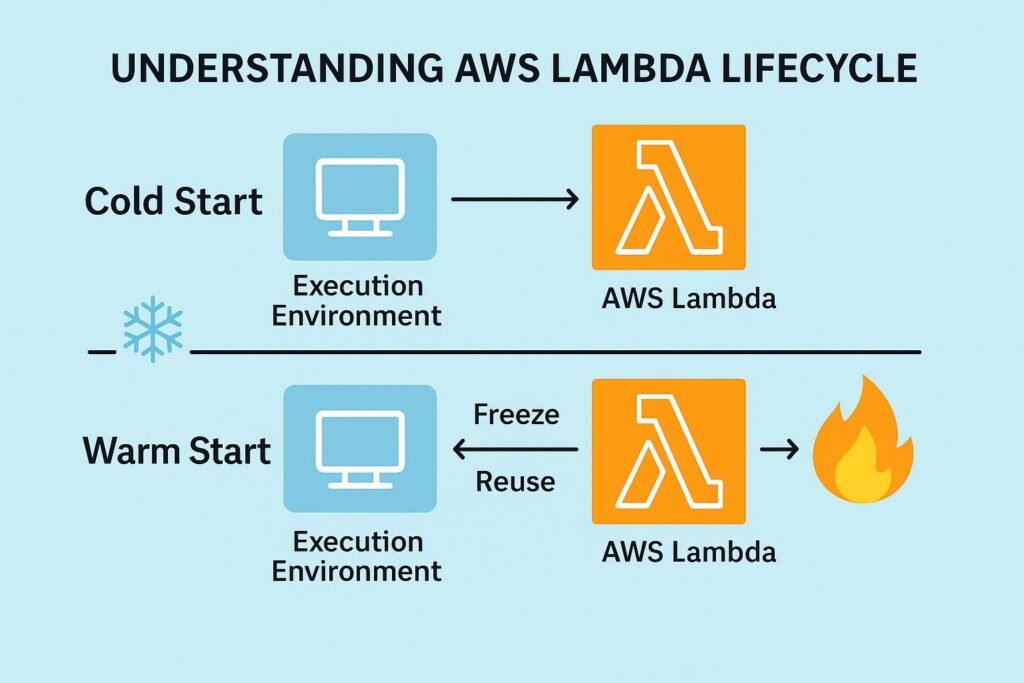
After your function finishes, AWS may keep the execution environment alive for some time.
Why?
Because another request might arrive soon.
So AWS can reuse the existing environment.
This leads to two important concepts:
Cold Start
No existing environment is available.
AWS has to create one.
Request
   ↓
Create environment
   ↓
Start runtime
   ↓
Load code
   ↓
Run function
This takes a little extra time.
Warm Start
An existing environment is available.
AWS can reuse it.
Request
   ↓
Existing environment
   ↓
Run function
This is generally faster.
7. Lambda does NOT keep your function running
This is a common misunderstanding.
If you have:
handler()
This doesn’t keep this function running forever.
Instead:
Request comes
     ↓
Lambda starts
     ↓
Function executes
     ↓
Function finishes
     ↓
Execution ends
If another request comes later, AWS can run the function again.
8. What happens when 1,000 users call it?
This is where Lambda becomes powerful.
Suppose one request comes in:
Request
   ↓
Lambda #1
Now suppose 100 requests arrive at the same time:
Request 1  → Lambda
Request 2  → Lambda
Request 3  → Lambda
...
Request 100 → Lambda
AWS can create multiple execution environments to handle the requests.
Conceptually:
                    ┌─ Environment 1
                    ├─ Environment 2
Requests ───────────┼─ Environment 3
                    ├─ Environment 4
                    └─ ...
This is automatic scaling.
You don’t manually create 100 servers.
AWS manages the required execution environments.
9. What happens when traffic decreases?
Suppose you had 100 requests per second:
100 requests
     ↓
Many Lambda environments
Then traffic drops:
2 requests
     ↓
Only a few environments needed
AWS can remove unused execution environments.
This is one reason Lambda is called serverless.
You don’t have to manually scale servers up and down.
10. Where does Lambda actually run?
This is an important point.
“Serverless” does not mean there are no servers.
There are absolutely servers.
AWS owns and manages them.
The difference is:
Traditional approach
You manage:
Server
OS
Updates
CPU
Memory
Scaling
Networking
Application
Lambda
You mainly manage:
Your code
Dependencies
Configuration
AWS manages much of the infrastructure underneath.
So “serverless” really means:
You don’t have to manage the servers.
11. What happens with your dependencies?
Suppose your Lambda uses a package:
import axios from "axios";
When you deploy, your code and required dependencies are packaged together.
Conceptually:
Lambda Package
├── index.js
├── package.json
├── node_modules/
│   └── axios/
└── other files
AWS makes this package available inside the execution environment.
12. What about environment variables?
You might have:
DATABASE_URL
AWS_SECRET
API_KEY
Instead of hardcoding them:
const key = "abc123";
you configure environment variables in Lambda.
Your code can then access them:
process.env.API_KEY
AWS injects those configuration values into the execution environment when the function runs.
For sensitive production secrets, services such as AWS Secrets Manager are generally preferable to putting secrets directly into Lambda environment variables.
13. What happens if your Lambda fails?
Suppose your function throws an error:
throw new Error("Something went wrong");
Lambda records information about the invocation.
You can inspect logs through CloudWatch Logs.
Conceptually:
Lambda
   ↓
Execution
   ↓
console.log()
   ↓
CloudWatch Logs
For example:
console.log("User migration started");
console.log(event);
You can then see those logs in CloudWatch.
This is extremely useful when debugging Lambda functions.
14. What about permissions?
Lambda doesn’t automatically have permission to do everything inside AWS.
You normally assign an IAM execution role.
For example, your Lambda might need to:
Lambda
  ↓
Read from S3
or:
Lambda
  ↓
Write to DynamoDB
or:
Lambda
  ↓
Write logs to CloudWatch
AWS uses IAM permissions to decide whether Lambda is allowed to perform those operations.
Conceptually:
Lambda
   ↓
IAM Role
   ↓
Allowed AWS Services
This is an important security layer.
What is Amazon DynamoDB?
Amazon DynamoDB is a fully managed NoSQL database provided by AWS.
In simple terms:
DynamoDB is a database where you can store and retrieve application data without managing database servers.
15. A real example: Cognito + Lambda
Since you’ve been working with AWS Cognito, let’s use that as an example.
Suppose Cognito needs to migrate an existing user.
The flow can look like:
User enters email/password
            ↓
       Cognito User Pool
            ↓
     User doesn't exist
            ↓
      Cognito triggers
       Lambda function
            ↓
      Lambda receives
       user information
            ↓
   Lambda checks your Laravel DB
            ↓
      User found?
        ↙       ↘
      Yes        No
       ↓          ↓
   Validate     Reject
       ↓
   Cognito continues
Behind the scenes, AWS is doing roughly:
1. Receive Cognito event
        ↓
2. Find/prepare Lambda environment
        ↓
3. Start Node.js runtime
        ↓
4. Load your Lambda code
        ↓
5. Call handler(event)
        ↓
6. Your code executes
        ↓
7. Lambda returns response
        ↓
8. Cognito processes response
You only wrote the business logic.
AWS handles the infrastructure around it.
16. The most important concept: Lambda is event-driven
If you remember only one thing, remember this:
Lambda runs code in response to an event.
For example:
HTTP Request
     ↓
   Lambda
S3 Upload
     ↓
   Lambda
Cognito Event
     ↓
   Lambda
Scheduled Event
     ↓
   Lambda
SQS Message
     ↓
   Lambda
Lambda doesn’t need you to continuously run a server waiting for these events.
AWS handles that infrastructure.
17. Lambda’s complete lifecycle
A simplified view of what happens behind the scenes is:
              EVENT
                │
                ▼
        AWS receives event
                │
                ▼
     Is an execution environment
             available?
          /             \
        Yes              No
         │                │
         │        Create environment
         │                │
         │        Start runtime
         │                │
         │        Load Lambda code
         │                │
         └───────┬────────┘
                 ▼
           Call handler()
                 │
                 ▼
          Execute your code
                 │
                 ▼
           Return response
                 │
                 ▼
         Record logs/metrics
                 │
                 ▼
      Environment may be reused
       or eventually removed
18. Lambda vs a normal server
| Traditional Server | AWS Lambda |
|---|---|
| You manage the server | AWS manages infrastructure |
| Server usually runs continuously | Function runs when invoked |
| You manage scaling | AWS can scale automatically |
| Pay for server capacity/time | Pay based largely on invocations and execution |
| Application stays running | Execution environments are created/reused |
| You manage OS updates | AWS manages underlying infrastructure |
In one simple sentence
AWS Lambda is essentially AWS saying:
“Give me your code and tell me what should trigger it. When that event happens, I’ll provide the computing environment, run your code, handle scaling, and give you the result.”
And behind the scenes, the key components are:
Event → Execution Environment → Runtime → Your Code → Response → Logs → Environment Reuse/Removal
For more insightful tutorials, visit our Tech Blogs and explore the latest in Laravel, AI, and Vue.js development