Creating a form builder is a classic software engineering challenge that sits at the intersection of flexibility and constraint. On one hand, you want to empower users to build any form they can imagine. On the other hand, you need a database structure that is queryable, performant, and, most importantly, rock-solid.
In this post, I’m taking you deep into the trenches of my latest project: a multi-tenant, group-based form builder. We’ll talk about why I chose specific architectural patterns, the “hard parts” that kept me up at night, and the three massive loopholes I had to close to ensure this system didn’t eat itself over time.
My Approach: The “Single Source of Truth” Philosophy
When I started this project, I spent a week just thinking about the “contract” between the frontend and the backend. I’ve seen too many systems where the frontend “guesses” what the form should look like, or where the backend validation is a second-class citizen to the UI.
My core philosophy was simple: The Backend is the Source of Truth.
1. Truth in Atomicity (No Partial Saves)
One of the most defining decisions I made was the Atomic Persistence route. In most “standard” CRUD apps, you update a specific field or row. But form builders are different. If a user reorders 50 fields, moves them between three groups, and changes five labels in one go, a traditional “diffing” update is a nightmare.
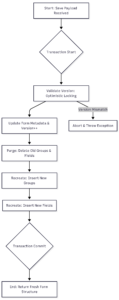
Instead, I chose to treat the entire form as a single, atomic unit. When you hit “Save” in my builder:
- We start a database transaction (
DB::transaction). - We update the form’s metadata (name, description, version).
- We purge all existing groups and fields associated with that form.
- We recreate the entire structure fresh from the payload.
Why? Because reordering is hard, but recreating is easy. This approach ensures that the database is always an exact reflection of the UI state at the moment of save. No “zombie” fields left behind from 10 versions ago.
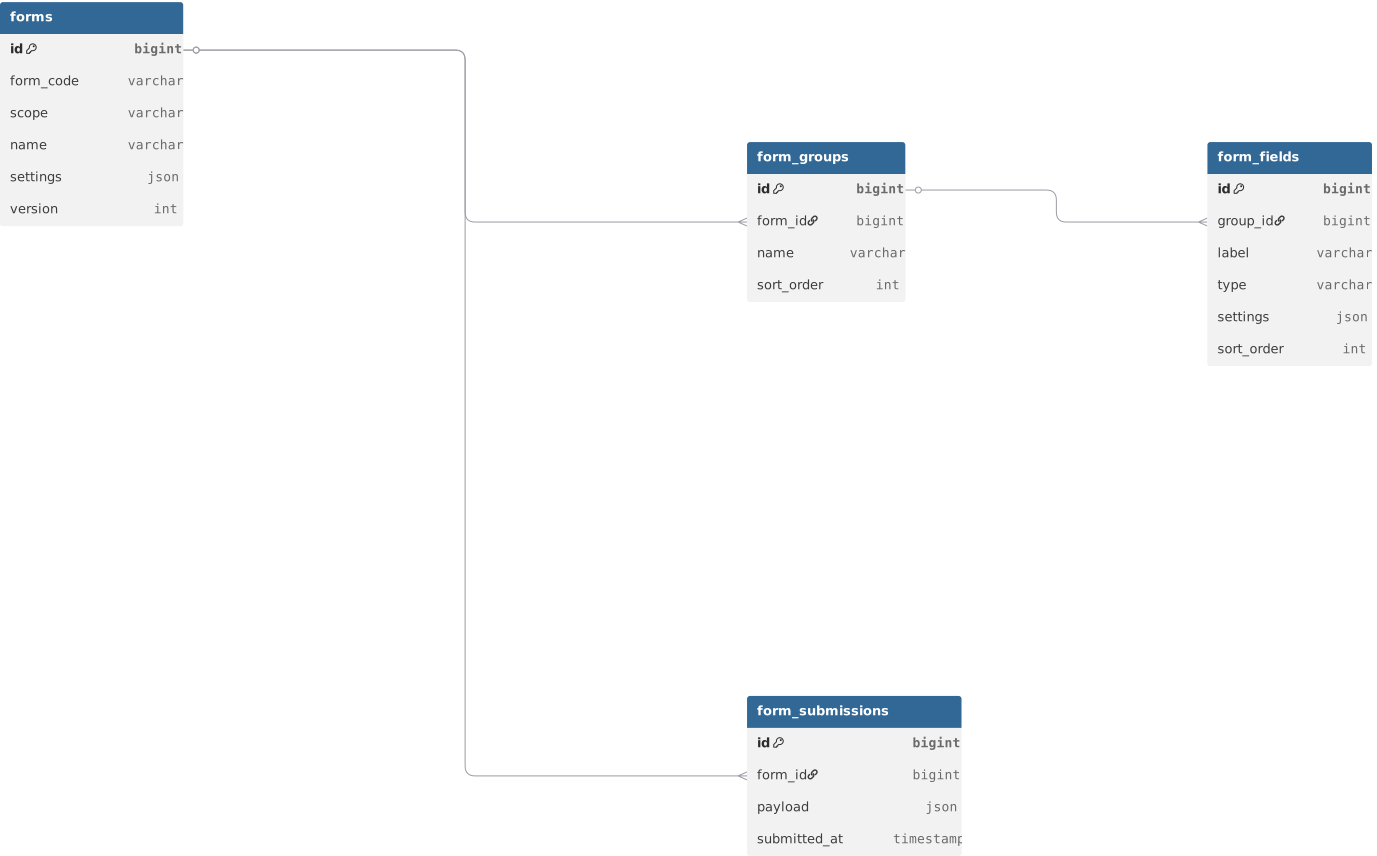
2. The Database Blueprint (ERD)
A robust structure begins with a clear understanding of relationships. I moved away from the “One Big JSON Blob” approach for the core structure because I needed to query across forms (e.g., “Find all forms that have a ‘First Name’ field”).
Architectural Pillar: Groups as First-Class Citizens
One of the first difficulties I hit was layout. A flat list of 100 fields is easy to code but impossible for a human to navigate. I realized that Groups must define the structure, not just the labels.
In my schema, every field MUST belong to a group. Groups handle the logical separation—things like “Basic Info,” “Medical History,” or “Emergency Contact.”
By making groups a mandatory part of the hierarchy:
- Frontend Logic is Simplified: The UI just loops through
groupsand then nestedfields. No complex “if field.index < 10" logic. - Reordering is Logical: Users can move entire groups (and all their fields) as a single block.
- Better UX: We can support “Empty Groups” as placeholders for future expansion, which turned out to be a highly requested feature.
The Hard Parts: Real-World Challenges
Beyond the theory, we hit some “walls” that required creative solutions.
1. The Payload Reconstruction Headache
Normalization is great for data integrity, but it’s a pain for the API. My database has four different tables just to define a form, but my frontend wants a single, nested JSON object.
The difficulty: Querying these relationships without hitting the “N+1” performance trap (where you run one query for the form, then one for each group, then one for each field).
The solution: We leaned heavily on Eager Loading and API Resources.
// In the Controller/Service
return Form::with(['groups.fields', 'status'])->findOrFail($id);
By loading the entire tree in one or two optimized queries, we keep the response time under 100ms even for massive forms. The API Resource then transforms those flat DB rows into the beautiful nested structure the frontend expects.
2. Assignment Ambiguity in Multi-Tenancy
In a multi-tenant world, things get messy. A form might be a “Global Default” (for all tenants), or it might be “Customized” just for Client A at Location B.
The difficulty: IDs overlap. Client #1 might have an ID of 1, and Location #1 might also have an ID of 1.
The realization: I needed explicit pivot tables with typed discriminators. We created form_assigned_users and form_locations to ensure that a form assigned to a “Shift” doesn’t accidentally show up in a “Consumer Intake” flow.
Deep Dive: The Power of JSON-Driven Validation
This is where the system really shines. Instead of adding 50 columns to the form_fields table for things like min, max, is_email, regex, and required, we consolidated everything into a single settings JSON column.
Why JSON for Validation?
- Leanness: The database schema rarely needs to change.
- Dynamic UI: The frontend reads the
settingsblob and automatically attaches a date picker, a character counter, or a regex validator. - One Rule to Rule Them All: The same JSON rule that shows a red error message in the UI is used by the backend to reject invalid data.
Example Validation Schema:
"settings": {
  "validation": {
    "required": true,
    "min": 10,
    "max": 500,
    "pattern": "/^[a-zA-Z0-9 ]*$/"
  },
  "ui": {
    "placeholder": "Describe your experience...",
    "help_text": "Max 500 characters allowed."
  }
}
The Atomic Save Flow: How We Ensure Integrity
To maintain absolute integrity, we follow a strict sequence during every update. If any step fails, the entire save is rolled back.
Why we chose “Delete and Recreate” vs. “Syncing”
Syncing (calculating which rows to update, which to delete, and which to add) is technically “cleaner” in terms of ID stability, but it is exponentially more complex to debug. In a form builder, fields are constantly moving between groups. A sync algorithm that handles parent-child moves across multiple levels is prone to edge-case bugs.
My approach: I traded a slightly higher ID churn for absolute, guaranteed data consistency.
🚀 Pro-Level: 3 Loopholes I Had to Close
Even with a solid plan, I found “traps” that could have misguided my users if I hadn’t prepared for them.
1. The “Random Key” Trap
The Loophole: Since we “Delete and Recreate” fields on every save, what happens to the fields’ identity? Initially, I was generating a random field_key (like first_name_xYz12) every time.
The Problem: If a user submits a form, the data is saved against first_name_xYz12. If an admin then edits the form label, the key changes to first_name_AbC34. Suddenly, all your old submission data is “lost” because the keys no longer match.
The Fix: Stable Keys. The frontend must send back the existing field_key for any updated fields. The backend only generates a random key for newly added fields.
$fieldKey = $fieldData['field_key'] ?? (Str::slug($fieldData['label']) . '-' . Str::random(4));2. Soft-Delete Bloat
The Loophole: Laravel’s SoftDeletes is a blessing and a curse. Because we delete and recreate fields on every save, the form_fields table was growing by hundreds of rows for every 10-minute editing session.
The Problem: 99.9% of the table was “zombie” rows where deleted_at was set. This slows down queries and wastes space.
The Fix: Hard Cleans for Definitions. We realized that while form submissions need audit trails, form definitions (the groups and fields themselves) don’t. We switched to forceDelete() during the purge step. If you need a history of what the form used to look like, you look at the payload stored in the form_submissions table for that specific version.
3. The “Lost Update” Problem
The Loophole: Imagine two admins, Sarah and Mike, both open the same form builder at 10:00 AM. Sarah finishes her changes at 10:05 and hits Save. Mike finishes his different changes at 10:06 and hits Save.
The Problem: Mike’s save silently overwrites Sarah’s work. Sarah’s 5 minutes of effort are gone forever.
The Fix: Optimistic Locking. We introduced a version column. When you open the form, you get version 5. When you save, you send back version: 5. The backend checks: “Is the current version still 5?” If yes, it saves and increments to 6. If Mike tries to save with version: 5, the server says: “Error! This form has changed. Please refresh.”
The Horizon: What’s Next for This Architecture?
Building this was a journey, but it’s not the destination. Here is what I’m looking at for the next version:
- Conditional Logic (The “If-Then” Problem): Expanding the
settingsJSON to support dependency rules (e.g., “If Category is ‘Other’, show the ‘Please Specify’ text box”). - Dynamic Caching: Caching the entire Form Resource in Redis so that rendering a form for 10,000 users doesn’t hit the database at all.
- Form Version Snapshots: Instead of just incrementing a number, we’ll store a “frozen” version of the entire form structure whenever a submission is made, ensuring that we can perfectly render old data even if the form is completely redesigned.
Final Thoughts
Building a form builder taught me that Simplicity is Hard. It takes a lot of complex backend logic to make a “simple” drag-and-drop experience. But by sticking to atomicity, leveraging JSON for flexibility, and being paranoid about data integrity through locking and stable keys, I built something that I’m proud to share.
Don’t just build a form; build a system that respects the data it collects.
For more insightful tutorials, visit our Tech Blogs and explore the latest in Laravel, AI, and Vue.js development